Sitecore‘s „HTML Cache“ feature on renderings has been a great tool since the early days of Sitecore. While in the world of headless, we‘re actually caching JSON instead of HTML, the functionality of this cache remains the same:
(more…)Tag: Performance
-

Infinite loop with dictionary domain
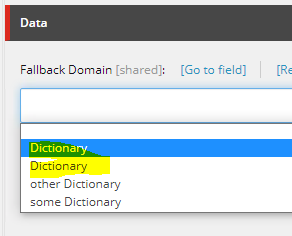
Two caveats when working with Sitecore’s dictionary domains:
1. Set uniqe names on each dictionary domain item
If two items have the same name i.E. “Dictionary” this will kick off an infinite loop when opening Experience Editor forcing the instance to freeze.

This will lead to an infinite loop! 
No issue here because of unique naming Update 08/11/2020: Apparently duplicate names aren’t the only thing that triggers these infinite loops. This is a confirmed bug on Sitecore 9.3. Contact Sitecore support, they have a fix for it.
2. Set IDs on site attributes instead of the dictionary names.
Quite a few examples out in the web set the dictionary domain on the site attribute by using it’s item name.
Bad Example:
<sitecore> <sites> <site name="website"> <patch:attribute name="dictionaryDomain">My Dictionary Domain Item</patch:attribute> </site> </sites> </sitecore>Internally, Sitecore will resolve the dictionary domain using a fast:// query which is much slower than querying by ID. Given labels are accessed quite often this could impact your performance.
Good example using Guids:
<sitecore> <sites> <site name="website"> <patch:attribute name="dictionaryDomain">{84B9F5F7-835F-4DF7-BEDA-2FF276A0506D}</patch:attribute> </site> </sites> </sitecore> -
Glass Mapper: Does the number of mapped fields have a performance impact?
Recently at work, the discussion arose if the number of fields mapped from Sitecore Items to our models would have a performance impact. The question was if we should limit the number of mapped properties in our IGlassBase interface to gain performance.
I did a simple test by mapping an item to a test interface (IGlassBaseTest) and measuring the execution time of these lines 50’000 times.
stopwatch.Start(); var item = context.GetItem<IGlassBaseTest>("/sitecore/content/GlassTest"); var theID = item.Id; stopwatch.Stop();Test 1: Bare minimum IGlassBaseTest
public interface IGlassBaseTest { [SitecoreId] Guid Id { get; } }Total time for 50’000 cycles: 34ms
Test 2: Extended Interface
I’ve added the [SitecoreItem] attribute guessing it might have an impact as it needs to map the entire Sitecore Item to a property.
public interface IGlassBaseTest { [SitecoreId] Guid Id { get; } [SitecoreItem] Item Item { get; } }Total time for 50’000 cycles: 39ms
Considering the large amount of cycles, the 5ms difference is irrelevant. In some measurements the Test 2 scenario was actually even faster than Test 1.
Test 3: Fully blown interface
And now for the whole thing.
public interface IGlassBaseTest { [SitecoreId] Guid Id { get; } [SitecoreInfo(SitecoreInfoType.FullPath)] string FullPath { get; } [SitecoreInfo(SitecoreInfoType.DisplayName)] string DisplayName { get; } [SitecoreInfo(SitecoreInfoType.Name)] string Name { get; } [SitecoreInfo(SitecoreInfoType.Language)] Language Language { get; } [SitecoreInfo(SitecoreInfoType.TemplateId)] ID TemplateId { get; } [SitecoreInfo(SitecoreInfoType.TemplateName)] string Template { get; } [SitecoreInfo(SitecoreInfoType.Url)] string Url { get; } [SitecoreChildren(IsLazy = true)] IEnumerable Children { get; } [SitecoreParent(InferType = true, IsLazy = true)] IGlassBase Parent { get; } [SitecoreItem] Item Item { get; } }Total time for 50’000 cycles: 49ms
Conclusion
While the first two tests didn’t show a significant difference, the last test adds roughly 10ms to our total. But remeber, that’s only 0.0002ms per execution which can also be considered insignificant in my opinion.
Based on these tests I can say, that the number of fields mapped by Glass Mapper only has a negligible impact on performance. -
Experiences with Glass Cache
In version 4, Glass Mapper introduced a caching mechanism to speed up access to mapped objects. Basically, once an object is mapped, it is stored in Glass Cache which by default utilizes HttpCache in Memory. The next time the same object is mapped, it will be returned from the cache instead of being read from the Sitecore database which in many cases speeds things up. The cache is cleared by publishing.

Caveats
When reading things like “Glass has no performance issues anymore, they have caching now” made me want to check this out for myself. After all we would be introducing yet another caching layer to the several existing layers Sitecore already has.
I have evaluated the current implementation of Glass cache for the use in a large multisite solution with dedicated authoring and delivery instances. Models were being generated on the fly using TDS. In this scenario, I have found some shortcomings of the current Glass Cache implementation:
· Glass Cache cannot be globally enabled / disabled via config
· Enable / Disable cache on a model can only be done using code
Glass Cache cannot be globally enabled / disabled via config
On authoring instances, we wanted to globally disable caching. This is because authors were used to seeing what they edited in “normal” mode without having to publish.
Unfortunately, there is currently no safe way to globally disable Glass cache. An option would be to use the following code on application startup:// Caution: this doesn’t globally disable cache new DisableCache();
Unfortunately this leads to the issue that caching is re-activated in some cases when DisableCache() is used multiple times. For details see this ticket.
Update 06.11.2015:
According to Mike Edwards this issue is fixed and the fix will be part of next release of Glass Mapper.Cacheable=true / false only via code
In this particular scenario, when generating models using TDS, we basically only have the option of enabling caching for ALL models or NONE at all. (add annotations in the T4 Templates)
Some more control over which Templates should be cached would be great. This can probably be accomplished by reading a property of the model prior to adding it to cache.
[SitecoreType(TemplateId=IMyTeaserTemplateConstants.TemplateIdString, Cachable = true)] public class MyTeaserTemplate : GlassBase, IMyTeaserTemplate { ...Speed testing!
I ended up testing several components built with Glass comparing loading times, finding that the difference between cached and uncached was relatively small. (Glass Cached components needed roughly 8% less time than uncached ones in my test). Of course, when accessing items very often i.E. hundreds of times in a row, Cached will be considerably faster but in a “day-to-day scenario”, i.E. a link list component with 10-20 links, the difference is insignificant in my opinion.
Sitecore HTML Cache for the win
When switching on Sitecore’s HTML Cache on a component, there is no difference between Glass Cached and uncached anymore. This is because the component’s code isn’t executed anymore on a cache hit, making the performance gain through Glass Cache even more insignifficant.
Conclusion
I love to use Glass Mapper especially since V4, but I currently don’t advise using Glass Cache. After all, Glass is already quite fast without it! I rather make use of Sitecore’s tried and tested HTML cache feature to speed up my components.
Any thoughts on this are highly appreciated. Feel free to comment or send me a message.