Sitecore has recently made changes to their product support lifecycle. These changes have been effective since 1 June 2026.
(more…)Category: Uncategorized
-
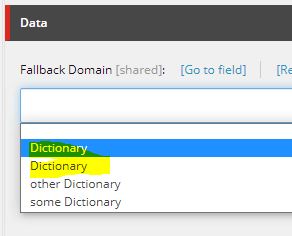
Infinite loop with dictionary domain
Two caveats when working with Sitecore’s dictionary domains:
1. Set uniqe names on each dictionary domain item
If two items have the same name i.E. “Dictionary” this will kick off an infinite loop when opening Experience Editor forcing the instance to freeze.
This will lead to an infinite loop! 
No issue here because of unique naming Update 08/11/2020: Apparently duplicate names aren’t the only thing that triggers these infinite loops. This is a confirmed bug on Sitecore 9.3. Contact Sitecore support, they have a fix for it.
2. Set IDs on site attributes instead of the dictionary names.
Quite a few examples out in the web set the dictionary domain on the site attribute by using it’s item name.
Bad Example:
<sitecore>
  <sites>
      <site name="website">
	<patch:attribute name="dictionaryDomain">My Dictionary Domain Item</patch:attribute>
	</site>
  </sites>
</sitecore>
Internally, Sitecore will resolve the dictionary domain using a fast:// query which is much slower than querying by ID. Given labels are accessed quite often this could impact your performance.
Good example using Guids:
<sitecore> <sites> <site name="website"> <patch:attribute name="dictionaryDomain">{84B9F5F7-835F-4DF7-BEDA-2FF276A0506D}</patch:attribute> </site> </sites> </sitecore> -

DiSA Episode 4: Client-side Event Tracking
Coders, your time has come! In this episode, we’re going to trigger client-side events from Javascript using XdbTracker – a Client-side Event Tracker for Sitecore 9.x
We’re going to fill even more built-in Experience Analytics reports with data… the dashboards are starting to look quite impressive.
XdbTracker is available on Github:
https://github.com/lowedown/XdbTrackerXConnectHelper can also be downlaoded on Github:
https://github.com/lowedown/xConnectHelper -

DiSA Episode 3: Content Profiling & Identification
In this episode of Diving into Sitecore Analytics, we’re going to gain insights into our (currently) anonymous audience. We’ll create segments based on content interest (Content Profiling) and we will look into identifying individual users based on unique identifiers.
These two powerful concepts – built in to the Sitecore Experience Platform – provide a huge advantage over classic analytics tools like Google Analytics.
The tool I used in the video is called xConnectHelper and is available on Github.
Code to identify contacts
To identify contacts and set contact facets, you can use the ContactRepository and TrackingService classes below for reference.
Important: Before identifying an anonymous visitor, make sure that the user has given consent to do so in compliance with applicaple data protection regulations (i.E. GDPR)
-
Allow lookup field queries to respect site root
This post shows two ways of using relative lookup field queries in a multisite environment. (more…)
-
Web API routes failing after updating to 8.1 Update-3
After updating to 8.1 Update-3 from 8.1 Initial Release our custom Web API routes on CM and CD were failing with the following exception:
-
Experiences with Glass Cache
In version 4, Glass Mapper introduced a caching mechanism to speed up access to mapped objects. Basically, once an object is mapped, it is stored in Glass Cache which by default utilizes HttpCache in Memory. The next time the same object is mapped, it will be returned from the cache instead of being read from the Sitecore database which in many cases speeds things up. The cache is cleared by publishing.
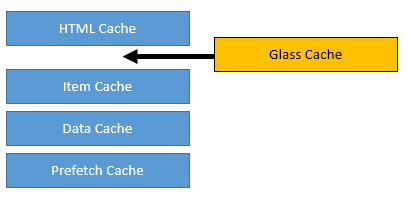
Caveats
When reading things like “Glass has no performance issues anymore, they have caching now” made me want to check this out for myself. After all we would be introducing yet another caching layer to the several existing layers Sitecore already has.
I have evaluated the current implementation of Glass cache for the use in a large multisite solution with dedicated authoring and delivery instances. Models were being generated on the fly using TDS. In this scenario, I have found some shortcomings of the current Glass Cache implementation:
· Glass Cache cannot be globally enabled / disabled via config
· Enable / Disable cache on a model can only be done using code
Glass Cache cannot be globally enabled / disabled via config
On authoring instances, we wanted to globally disable caching. This is because authors were used to seeing what they edited in “normal” mode without having to publish.
Unfortunately, there is currently no safe way to globally disable Glass cache. An option would be to use the following code on application startup:// Caution: this doesn’t globally disable cache new DisableCache();
Unfortunately this leads to the issue that caching is re-activated in some cases when DisableCache() is used multiple times. For details see this ticket.
Update 06.11.2015:
According to Mike Edwards this issue is fixed and the fix will be part of next release of Glass Mapper.Cacheable=true / false only via code
In this particular scenario, when generating models using TDS, we basically only have the option of enabling caching for ALL models or NONE at all. (add annotations in the T4 Templates)
Some more control over which Templates should be cached would be great. This can probably be accomplished by reading a property of the model prior to adding it to cache.
[SitecoreType(TemplateId=IMyTeaserTemplateConstants.TemplateIdString, Cachable = true)]
 public class MyTeaserTemplate : GlassBase, IMyTeaserTemplate
 {
   ...
Speed testing!
I ended up testing several components built with Glass comparing loading times, finding that the difference between cached and uncached was relatively small. (Glass Cached components needed roughly 8% less time than uncached ones in my test). Of course, when accessing items very often i.E. hundreds of times in a row, Cached will be considerably faster but in a “day-to-day scenario”, i.E. a link list component with 10-20 links, the difference is insignificant in my opinion.
Sitecore HTML Cache for the win
When switching on Sitecore’s HTML Cache on a component, there is no difference between Glass Cached and uncached anymore. This is because the component’s code isn’t executed anymore on a cache hit, making the performance gain through Glass Cache even more insignifficant.
Conclusion
I love to use Glass Mapper especially since V4, but I currently don’t advise using Glass Cache. After all, Glass is already quite fast without it! I rather make use of Sitecore’s tried and tested HTML cache feature to speed up my components.
Any thoughts on this are highly appreciated. Feel free to comment or send me a message.
-
Custom FxCop Ruleset for Sitecore
Recently, my Co-Worker Daniel and I were allowed to present our way of ensuring code-quality using Sonar and custom Sitecore FxCop rules at the first Swiss Sitecore User Group.
Our solution is based on the shared source module of Johannes Zijlstra to which we now were allowed to contribute our changes. Thanks for that!
If you want to learn more about how to use custom FxCop rules for Sitecore, check out:
http://trayek.wordpress.com/2014/01/07/sitecore-and-fxcop/
The source code can be found on BitBucket:
https://bitbucket.org/jzi/sitecore.fxcop/overview -
Failing DNS lookups slowing down site after upgrade
I ran into a problem today while setting up a content delivery server after upgrading from Sitecore 6.4 to 7.2. After setting everything up, the site ran very slowly and the Sitecore Log started filling with exceptions like this:
 System.Net.Sockets.SocketException: The requested name is valid, but no data of the requested type was found

...

Sitecore.Web.WebUtil.GetHostIPAddress()
When looking into what happens inside GetHostIPAddress() I found out that Sitecore calls this method to resolve the IP from the host name on each request.
Normally not a problem but, in this setup, the CD running behind a load balancer couldn’t resolve the domain name it was serving. That way DNS lookup timed out on each request. By adding the domain names of the site with the local IP to the hosts file, I could resolve the problem and the site was immediately working at full speed again.
# example hosts file entry

127.0.0.1 www.mydomain.com
By the look of it, older versions of Sitecore didn’t do this kind of DNS resolving on each request. That’s why you should keep this in mind when upgrading CD servers.
-
PublishAgent skipping all items when CheckSecurity is activated
We ran into an issue when trying to publish the entire site on a regular basis using PublishAgent. We have it set up to publish the entire site every hour.
<agent type="Sitecore.Tasks.PublishAgent" method="Run" interval="01:00:00">
 <param desc="source database">master</param>
 <param desc="target database">web</param>
 <param desc="mode (full or smart or incremental)">smart</param>
 <param desc="languages">en</param>
 </agent>
We noticed though, that new items weren’t being published. The publish log showed the following:
ManagedPoolThread #14 13:12:13 INFO PublishAgent started (source: master, target: web, mode: Smart, languages: en)
ManagedPoolThread #14 13:12:13 INFO Asynchronous publishing started. Job name: Publish to 'web'. Languages: en
10580 13:12:13 WARN SitePublish detected. PublishContext was overridden with DisableDatabaseCaches=True.
10580 13:12:13 INFO Starting [Publishing] - ProcessQueue
10580 13:13:04 INFO Finished [Publishing] - ProcessQueue in 50986 ms
10580 13:13:04 INFO Publish Mode : Full
10580 13:13:04 INFO Created : 0
10580 13:13:04 INFO Updated : 0
10580 13:13:04 INFO Deleted : 0
10580 13:13:04 INFO Skipped : 36712
Publishing manually was working fine.
After searching for a while, we found out the reason for PublishAgent skipping all items was quite obvious: We have set Publishing.CheckSecurity=true to make sure users could only publish the items they were allowed to. Unfortunately PublishAgent runs as sitecore\Anonymous who of course doesn’t have sufficient rights.
To solve this problem, you can implement a class that inherits PublishAgent and overrides the Run method. Then use UserSwitcher to switch to a user that has the appropriate rights.