Category: Coding

  • Making item-based webhook events work on Sitecore 10.3

    A great new feature on Sitecore XM Cloud and also XM/XP 10.3+ is the possibility to set up Webhooks for a variety of events eg. item_saved, item_created etc. There is a limitation though if you’re on Platform DXP (10.3+):

    (more…)
  • Don‘t cache renderings containing placeholders

    Sitecore‘s „HTML Cache“ feature on renderings has been a great tool since the early days of Sitecore. While in the world of headless, we‘re actually caching JSON instead of HTML, the functionality of this cache remains the same:

    (more…)
  • Customizing Headless Proxy Output Caching

    When building a site on Sitecore Headless / JSS you’ll eventually end up hosting it on a Headless Proxy Node instance. The Headles Proxy will perform server-side rendering of the page HTML for initial requests i.E. when you hit F5 (browser refresh). Subsequent requests are then usually rendered in the browser. So far so good.

    (more…)
  • Make Long Running Scheduled Agents Async
    Make Long Running Scheduled Agents Async

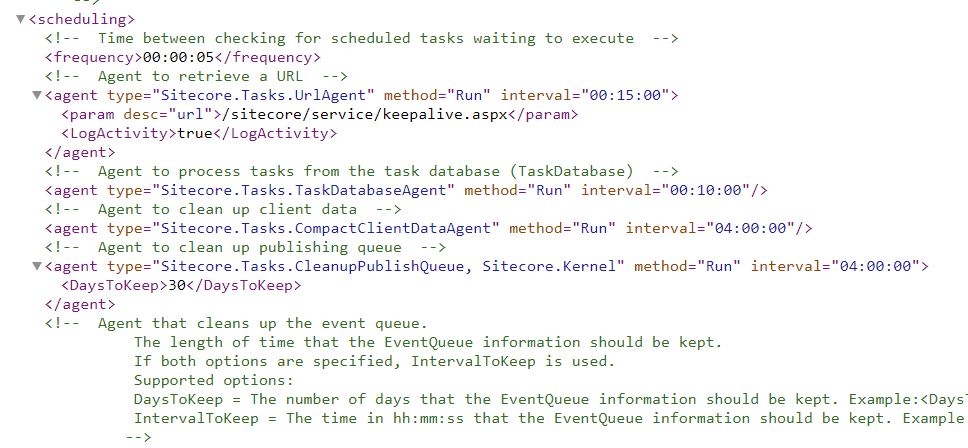
    Sitecore’s Scheduled Agents and Tasks have been around forever and are well-known members of the XM suite. Less known is a gotcha you might run into when implementing long running operations (i.E. background import/export, bulk updates,…)

    (more…)
  • Why silent saving with a processing server is a bad idea

    This post highlights why silent saving, EventDisabler or using BulkUpdateContext can lead to inconsistent data on a multi-CM environment i.E. when using a processing server. (more…)

  • Querying generated Template Models with Glass

    I have written some helper methods for working with generated Template Models and Glass.Mapper. Main goal is to make it easy for developers to query the Sitecore database using generated Template models.

    See Mike’s post for details on what Template Models are.

    Examples

    Let’s start with this fictional content tree:

    - Home (template: Home Page --> has Page as base template)
    -- Page 1 (template: Page)
    -- Page 2 (template: Page)
    ---- Sub Page 1 (template: Page)
    ---- Sub Page 2 (template: Page)
    ---- Data (template: Data folder)
    -- News Page (template: News Page --> has Page as base template)
    ---- News Entry 1 (template: News Detail Page --> hase News Page as base)
    ---- Data (template: Data folder)
    -- Page 3 (template: Page)
    -- Search Page (template: Search Page --> has Page as base template)
    -- Data (template: Data folder)
    

    Now, let us get the home node using glass:

    var homeItem = new SitecoreContext()
        .GetItem<IHomePageTemplate>("/sitecore/content/Home");
    

    The IHomePageTemplate interface has been generated using TDS or any other tool of choice. It implements the IGlassBase interface.

    Now, let’s get all the sub pages:

    var subItems = homeItem.Children<IPageTemplate>();  
    // Returns: Page 1, Page 2, News Page, 
    // Page 3, Search Page (all templates that inherit from PageTemplate)
    

    Now, let’s only get the news page(s):

    var subItems = homeItem.Children<INewsPageTemplate>(); 
    // Returns: News Page (as enumerable)
    

    Now, let’s get only the search page:

    var theSearchPage = homeItem.FirstChild<ISearchPageTemplate>(); 
    // Returns: Search Page (as model implementing ISearchPageTemplate)
    

    Let’s get all pages needed to build a page navigation:

    var subItems = homeItem.Descendants<IPageTemplate>(); 
    // Returns: Page 1, Page 2, Sub Page 1, 
    // Sub Page 2, News Page, News Entry 1, Page 3, Search Page
    

    Because IEnumerable is used, you can also go fancy with LinQ like this:

    var subItems = homeItem.Descendants<IPageTemplate>()
        .Where(p => !p.HideFromNavigation); 
    // Returns all items which inherit from Page 
    // and don't have the HideFromNavigation field set. 
    // (Assuming your Page Template has a HideFromNavigation checkbox field)
    

    Build a breadcrumb:

    var items = new SitecoreContext()
                    .GetCurrentItem<IPageTemplate>()
                    .Ancestors<IPageTemplate>()
                    .Where(p => !p.HideFromBreadcrumb);
    
    // (Assuming your Page Template has a HideFromBreadcrumb checkbox field)
    

    If you don’t like to use extension methods, you can also use the helpers in a more DI-friendly way:

    ITemplateModelHelper<IGlassBase> helper = new GlassTemplateModelHelper(new SitecoreContext());
    
    var children = helper.Children<ISomeTemplate>(myItem);
    

    Details

    The helpers use a custom attribute called TemplateModelHelper. It needs to be included in code generation templates to let the helpers know which interface maps to which templateID and also to handle template inheritance. See the documentation on GitHub for details how to set up.

    Example of a generated interface:

    [SitecoreType(TemplateId=IMyTemplate.TemplateIdString)] // , Cachable = true
    [TemplateModelHelper(TemplateId="076616fe-123f-443d-b627-ff4c1da8df57",BaseTemplates="453e35fc-46c5-46b3-a447-141c103f9989,0b34a6eb-d5b6-4d59-b5f9-3ce0bcb13fdd")]
    public partial interface IMyTemplate : IGlassBase, IMyBaseTemplate, IMyOtherBaseTemplate
    {
    }
    

    Performance

    The helper methods introduce as little overhead as possible and have been tested for performance. By making sure, only the relevant items (=matching TemplateId) are mapped to template models, the helpers are very efficient.
    The mapping Interface => TemplateID => Child Templates is done once and stored in memory as long as the application lives.

    Get the code

    If you like this way of querying Sitecore Items, feel free to grab the code from GitHub. Any feedback and improvements are most welcome.

  • Glass Mapper: Does the number of mapped fields have a performance impact?

    Recently at work, the discussion arose if the number of fields mapped from Sitecore Items to our models would have a performance impact. The question was if we should limit the number of mapped properties in our IGlassBase interface to gain performance.

    I did a simple test by mapping an item to a test interface (IGlassBaseTest) and measuring the execution time of these lines 50’000 times.

    stopwatch.Start();
    var item = context.GetItem<IGlassBaseTest>("/sitecore/content/GlassTest");
    var theID = item.Id;
    stopwatch.Stop();
    

    Test 1: Bare minimum IGlassBaseTest

    public interface IGlassBaseTest
    {
    [SitecoreId]
    Guid Id { get; }
    }
    

    Total time for 50’000 cycles: 34ms

    Test 2: Extended Interface

    I’ve added the [SitecoreItem] attribute guessing it might have an impact as it needs to map the entire Sitecore Item to a property.

    public interface IGlassBaseTest
    {
    [SitecoreId]
    Guid Id { get; }
    
    [SitecoreItem]
    Item Item { get; }
    }
    

    Total time for 50’000 cycles: 39ms

    Considering the large amount of cycles, the 5ms difference is irrelevant. In some measurements the Test 2 scenario was actually even faster than Test 1.

    Test 3: Fully blown interface

    And now for the whole thing.

    
    public interface IGlassBaseTest
    {
    [SitecoreId]
    Guid Id { get; }
    
    [SitecoreInfo(SitecoreInfoType.FullPath)]
    string FullPath { get; }
    
    [SitecoreInfo(SitecoreInfoType.DisplayName)]
    string DisplayName { get; }
    
    [SitecoreInfo(SitecoreInfoType.Name)]
    string Name { get; }
    
    [SitecoreInfo(SitecoreInfoType.Language)]
    Language Language { get; }
    
    [SitecoreInfo(SitecoreInfoType.TemplateId)]
    ID TemplateId { get; }
    
    [SitecoreInfo(SitecoreInfoType.TemplateName)]
    string Template { get; }
    
    [SitecoreInfo(SitecoreInfoType.Url)]
    string Url { get; }
    
    [SitecoreChildren(IsLazy = true)]
    IEnumerable Children { get; }
    
    [SitecoreParent(InferType = true, IsLazy = true)]
    IGlassBase Parent { get; }
    
    [SitecoreItem]
    Item Item { get; }
    }
    

    Total time for 50’000 cycles: 49ms

    Conclusion

    While the first two tests didn’t show a significant difference, the last test adds roughly 10ms to our total. But remeber, that’s only 0.0002ms per execution which can also be considered insignificant in my opinion.
    Based on these tests I can say, that the number of fields mapped by Glass Mapper only has a negligible impact on performance.