
In this episode, we’ll look at the built-in features that Experience Analytics has to offer and how we can now gain insights thanks to our campaign setup. Additionally we’ll look into custom segments – a feature new to Sitecore 10 allowing to set up custom filters for Experience Analytics reports.
Blog
-

Video Series: A Campaign from A to Z #3: A/B Testing
The third episode of this series will take a closer look at A/B testing. We’ll first use a test to determine the best text and call-to-action variant and then we’ll send an Email Campaign using A/B testing to determine the best variant.
-

Video Series: A Campaign from A to Z #2: Automated Emails

This episode focuses on setting up automated email campaings. We will be triggering these campaigns through form submissions and through Marketing Automation.
We will also be setting up contact lists that will be used later on in this sieries.
-

Video Series: A Campaign from A to Z. Episode 1
It’s late 2020 and I still see many sites built on the Sitecore Experience Platform that are not utilizing the potential of Sitecore’s Marketing features.
As an inspiration to marketers and developers, I’ve decided to set up a campaign for a fictive travel site. This campaign will cover many parts of the Sitecore Experience Platform including
- Goals and Engagement Value
- Behavioural Profiling
- Campaign Creator
- A/B Testing
- Sitecore Forms + Forms Extensions
- Experience Profile and setting identifiers
- Automated Email Campaigns
- Marketing Automation plans
- Contact Lits
- Manual Email Campaign with A/B Testing
- xConnect Helper
I hope you enjoy these videos. I’m always happy to receive feedback.
-

Infinite loop with dictionary domain
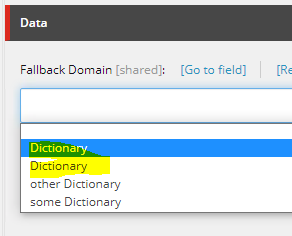
Two caveats when working with Sitecore’s dictionary domains:
1. Set uniqe names on each dictionary domain item
If two items have the same name i.E. “Dictionary” this will kick off an infinite loop when opening Experience Editor forcing the instance to freeze.

This will lead to an infinite loop! 
No issue here because of unique naming Update 08/11/2020: Apparently duplicate names aren’t the only thing that triggers these infinite loops. This is a confirmed bug on Sitecore 9.3. Contact Sitecore support, they have a fix for it.
2. Set IDs on site attributes instead of the dictionary names.
Quite a few examples out in the web set the dictionary domain on the site attribute by using it’s item name.
Bad Example:
<sitecore> <sites> <site name="website"> <patch:attribute name="dictionaryDomain">My Dictionary Domain Item</patch:attribute> </site> </sites> </sitecore>Internally, Sitecore will resolve the dictionary domain using a fast:// query which is much slower than querying by ID. Given labels are accessed quite often this could impact your performance.
Good example using Guids:
<sitecore> <sites> <site name="website"> <patch:attribute name="dictionaryDomain">{84B9F5F7-835F-4DF7-BEDA-2FF276A0506D}</patch:attribute> </site> </sites> </sitecore> -

DiSA Episode 4: Client-side Event Tracking

Coders, your time has come! In this episode, we’re going to trigger client-side events from Javascript using XdbTracker – a Client-side Event Tracker for Sitecore 9.x
We’re going to fill even more built-in Experience Analytics reports with data… the dashboards are starting to look quite impressive.
XdbTracker is available on Github:
https://github.com/lowedown/XdbTrackerXConnectHelper can also be downlaoded on Github:
https://github.com/lowedown/xConnectHelper -

DiSA Episode 3: Content Profiling & Identification

In this episode of Diving into Sitecore Analytics, we’re going to gain insights into our (currently) anonymous audience. We’ll create segments based on content interest (Content Profiling) and we will look into identifying individual users based on unique identifiers.
These two powerful concepts – built in to the Sitecore Experience Platform – provide a huge advantage over classic analytics tools like Google Analytics.
The tool I used in the video is called xConnectHelper and is available on Github.
Code to identify contacts
To identify contacts and set contact facets, you can use the ContactRepository and TrackingService classes below for reference.
Important: Before identifying an anonymous visitor, make sure that the user has given consent to do so in compliance with applicaple data protection regulations (i.E. GDPR)
-

DiSA Episode 2: Campaigns & Channels

In this episode of Diving into Sitecore Analytics, we’re going to use campaigns to feed our acquisition reports with useful data. (and do some neat personalization)
By the way, this post from 2014 is still valid! It describes how campaigns are triggered and how to customize triggering.
-

Video series “Diving into Sitecore Analytics” launched

I have launched a video series on youtube. The goal is to touch on as many Sitecore Analytics and Experience Platform features as possible without going into too much detail. We’ll start out with out of the box features…but coders don’t worry: there will be code in the later episodes! 🙂
Any kind of feedback is always welcome.
Episode 1: Getting Engaged
In the first episode, we’ll learn how to measure user engagement through goals and page events:
-
Handling Analytics Processing Issues
Recently, authors were reporting that no more Analytics data was being displayed since a certain date.
When analyzing the logfiles of the processing/reporting server, there were many of these entries:Exception: Sitecore.Xdb.Processing.Queue.ProcessingPoolException Message: Execution Timeout Expired. The timeout period elapsed prior to completion of the operation or the server is not responding.
The reason for this was that the Processing.Pools.InteractionLiveProcessingPool table had ~120’000 entries in it and was constantly growing. The attempts count on the top records was very high:
The processing server was running into a timeout when accessing this large amount of entries. Copying the entries into a temporary table and remove all entries from the InteractionLiveProcessingPool table helped fix this temporarily.
INSERT INTO tmp_ InteractionLiveProcessingPool SELECT * from InteractionLiveProcessingPool
Processing immediately started working again as new interactions were processed and processed entries were removed from the table every few seconds.
I then tried to copy blocks of the tmp_ InteractionLiveProcessingPool table back:INSERT INTO [xdb_processing_pools].[InteractionLiveProcessingPool] SELECT TOP 1000 * FROM dbo.tmp_InteractionLiveProcessingPool ORDER BY Created DESC</code> SELECT count(*) FROM [xdb_processing_pools].[InteractionLiveProcessingPool] DELETE FROM dbo.tmp_InteractionLiveProcessingPool WHERE [tmp_InteractionLiveProcessingPool].InteractionId IN (SELECT TOP 1000 InteractionId FROM dbo.tmp_InteractionLiveProcessingPool ORDER BY Created DESC)
But processing was very slow. It could hardly keep up with the live interactions that were being generated from site traffic.
To optimize this, I had to increase processing power by- Increasing the batch size
- Increasing aggregation worker threads
<aggregation role:require="Standalone or Processing"> <aggregator> <!-- Increase processing batch size from 64 to 256 --> <param type="Sitecore.Analytics.Core.ConfigurationHelper, Sitecore.Analytics.Core" desc="maximumBatchSize" factoryMethod="ToShort" arg0="256"/> </aggregator> <module type="Sitecore.Analytics.Aggregation.AggregationModule" singleInstance="true"> <BackgroundServices hint="list:Add"> <aggregator type="Sitecore.Analytics.Core.AsyncBackgroundService"> <!-- Increase aggregation worker threads to 4 --> <param desc="maxAgents" type="Sitecore.Analytics.Core.ConfigurationHelper, Sitecore.Analytics.Core" factoryMethod="ToInt" arg0="4" /> </aggregator> </BackgroundServices> </module> </aggregation>Watch your Processing Server performance after these changes!
If you’d have the same issue during a Reporting DB rebuild (InteractionHistoryProcessingPool) table, you would need to tweak the historyWorker background service instead. For details, see https://doc.sitecore.com/developers/91/sitecore-experience-platform/en/configure-processing-agents.html
Caveat: The documentation states:
«Adjust the MaxPoolSize property for the reporting database. The pool capacity should be at least about 120% of the number of agents (including processing, history, automation workers, and clean-up) that you have configured»
Not having the maxPoolSize set explicitly on the connection string means that the default value of 100 will be used. My total number of workers was still nowhere near this value hence the maxPoolSize didn’t need to be adjusted.
After these changes, processing was noticeably faster. I copied back all the entries from the temporary table and processing took roughly 6 hours to handle the remaining ~100’000 interactions.INSERT INTO [xdb_processing_pools].[InteractionLiveProcessingPool] SELECT * FROM dbo.tmp_InteractionLiveProcessingPool ORDER BY Created DESC SELECT count(*) FROM [xdb_processing_pools].[InteractionLiveProcessingPool] DELETE FROM dbo.tmp_InteractionLiveProcessingPool
And voilà, the reports were back: